
How to Create Your Own Workouts From Scratch in the Dr. Dish TMS
Do you own a Dr. Dish All-Star, All-Star+ or CT machine? If so, you are likely familiar with our Training Management System. Complete with over 200+ pre-built in workouts, as well as the ability to track and save stats with ease, the system is designed to help players improve year round.
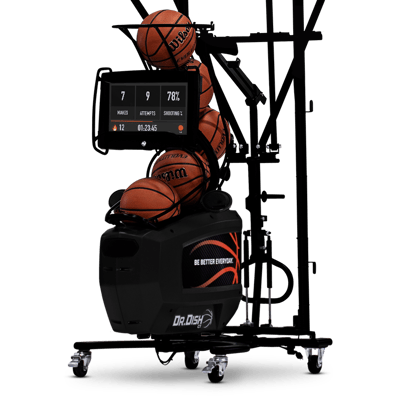
What you may or may not know is that you can create your own workouts inside of TMS. Today, we’ll be showing you exactly how to make your own workout. From start to finish, we’ll guide you through the process of taking your favorite concepts and bringing them to life on your own Dr. Dish machine. Let’s get started!
To begin, go here to sign up for a free TMS account. See the screen below for a visual.
If you already have an account, skip this step and log right in.
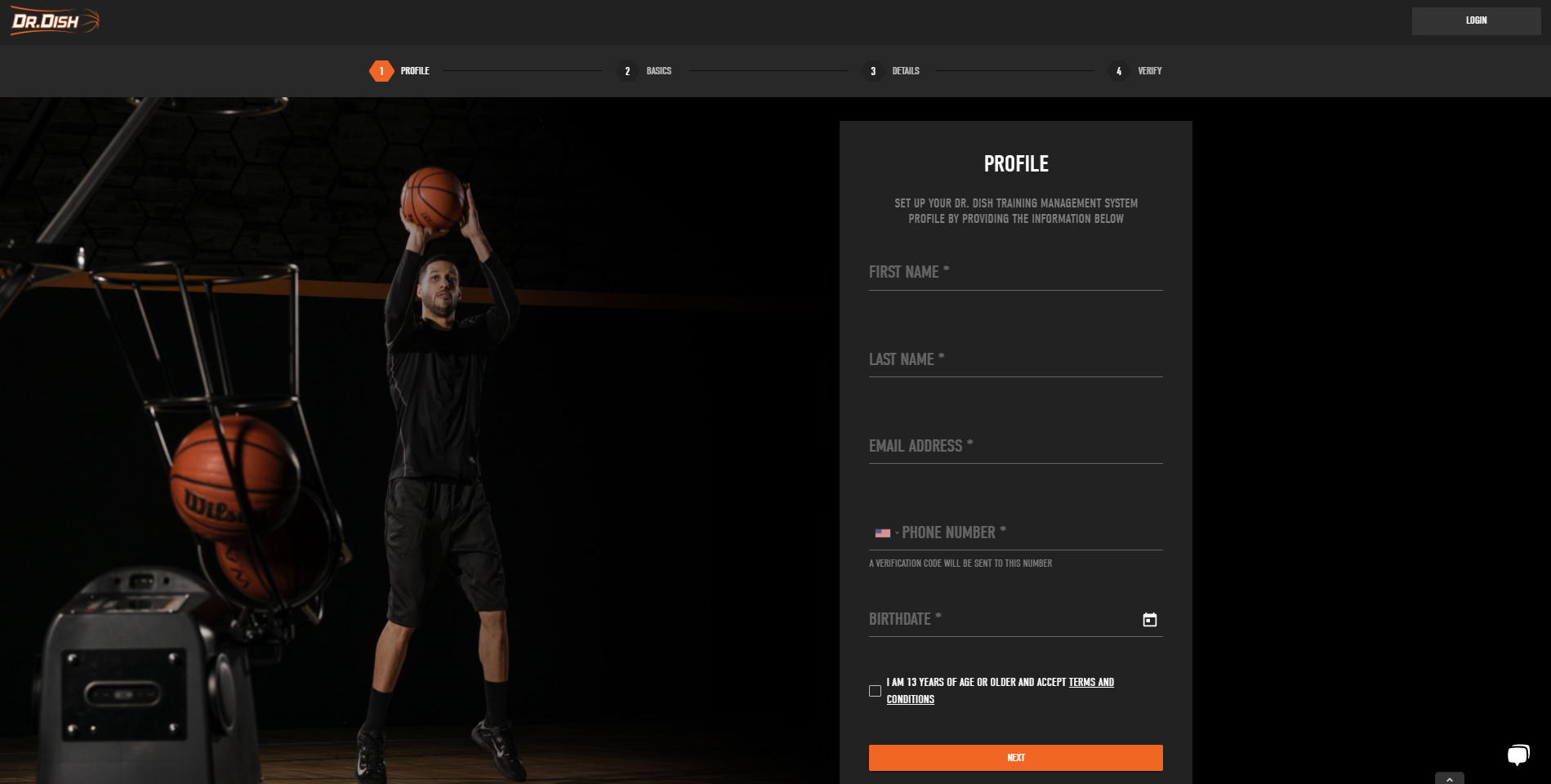
Dr. Dish TMS Free Account Sign Up Screen
Once you’re logged in, navigate to the “Training” tab at the top of the screen.
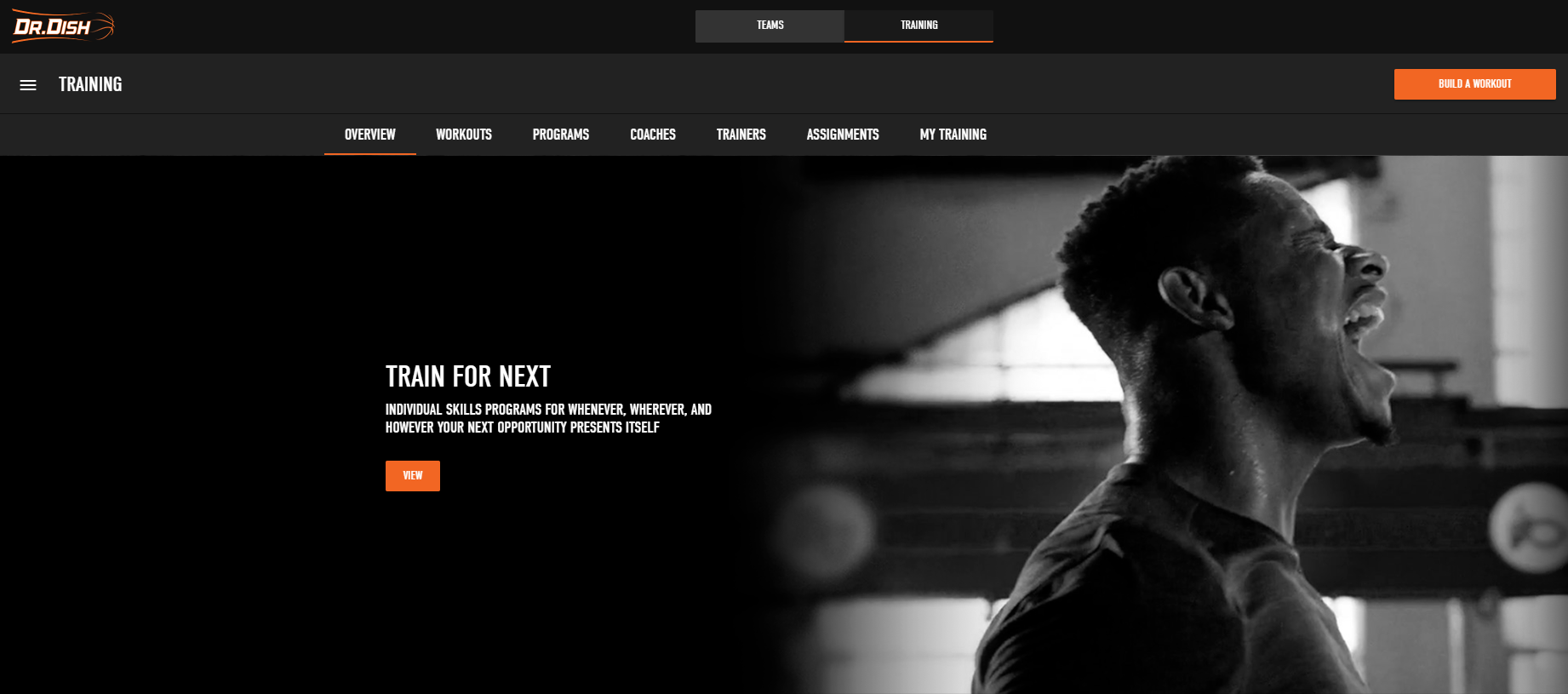
TMS Welcome Screen: Main Page
Step 1: Build A Workout
From there, click the “Build a Workout” button on the top right of the screen. To define terms, a workout is a series of drills. Drills are specific skills that can be added within a workout. The first step is to create a workout to house your various drills.
Here, you will be asked to fill out basic information about your workout. Label it with a name, assign a difficulty level, craft a description, and select where the machine will be located.
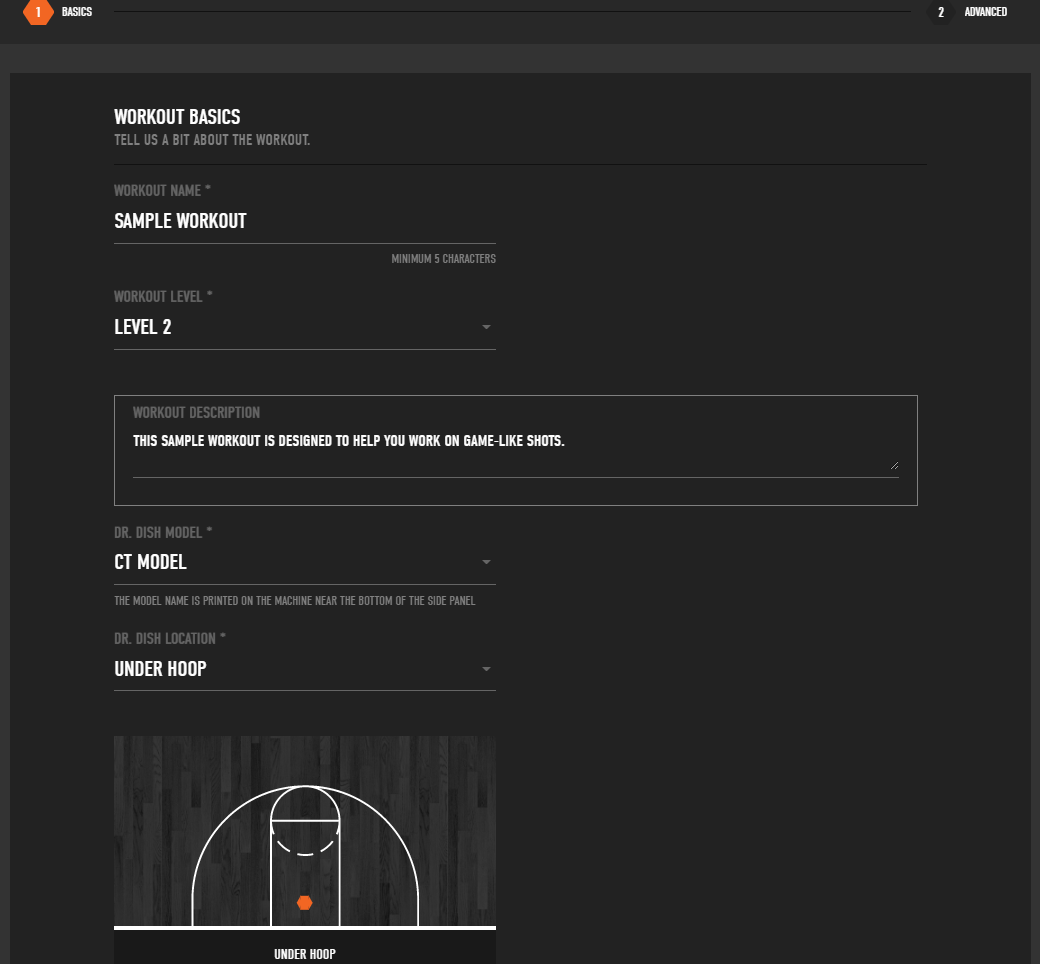
Workout Overview Screen
Next, fill in the "advanced options" to better define the workout.
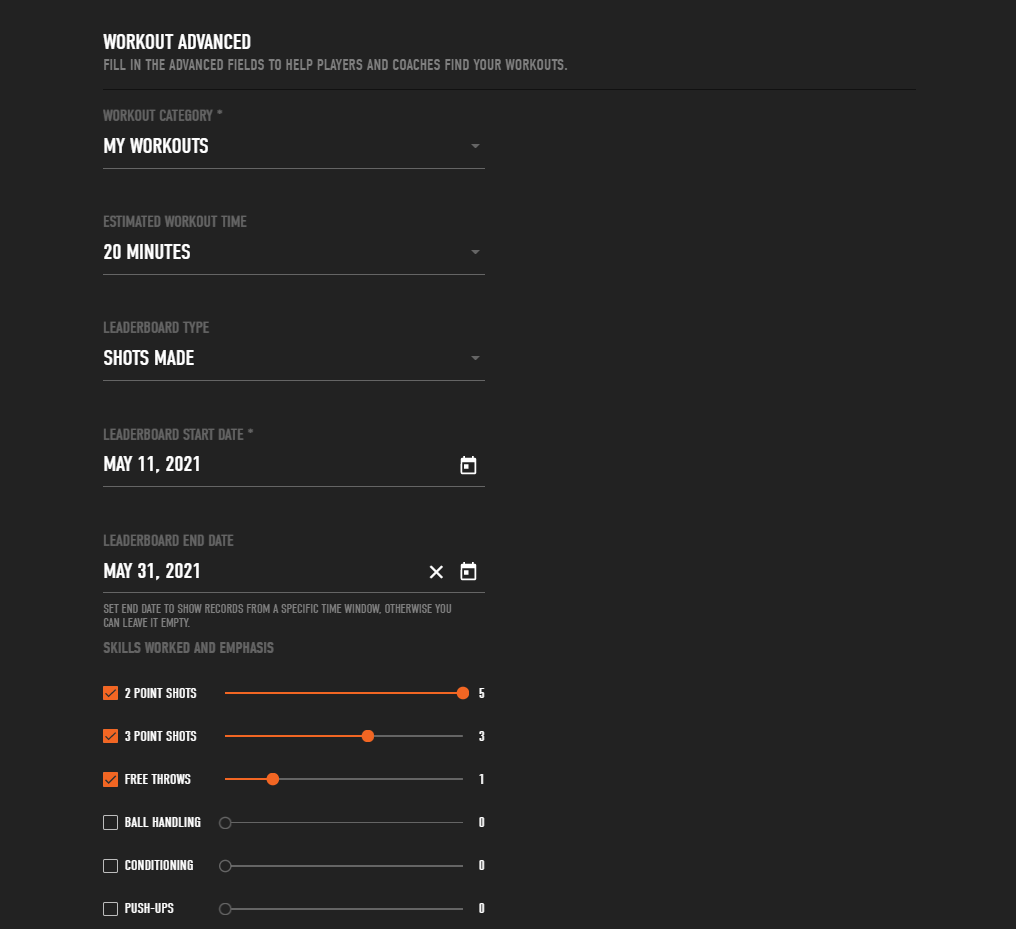
Advanced Options Screen
On this screen, you will fill in more specific details around the workout. A brief description on each field is listed below.
Workout time: How long the workout will take to complete.
Leaderboard type: This is where you determine what the goal of the workout will be. Shots made, shots taken, time, or streak mode are all options.
Leaderboard start/end date: This is where you can determine the start and end date for this specific workout. During this time window, players can compete for the top leaderboard ranking.
Workout attributes: Select all of the skills included in your workout. In addition to shooting, you can work in ball handling, conditioning, or push-ups.
Position groups: Determine what position groups this workout is suited for. Check as many positions as you’d like.
Number of players: Choose from 1 to 5 players, depending on if the workout is an individual or group-based activity.
Music Playlist URL: TMS is integrated with Spotify. This field allows you to plug in a playlist link to listen to during your workout.
Video upload: Upload your own instructional video to accompany your workout. This video will be available for players to watch before completing the workout. See below for an example of a workout overview.
Image upload: Select an image to accompany your workout. This image will serve as the visual for your workout inside of TMS. See an example below.
Step 2: Add Drills To The Workout
Next, you will add drills to populate your workout. The drills will be the specifics around what the workout will entail.
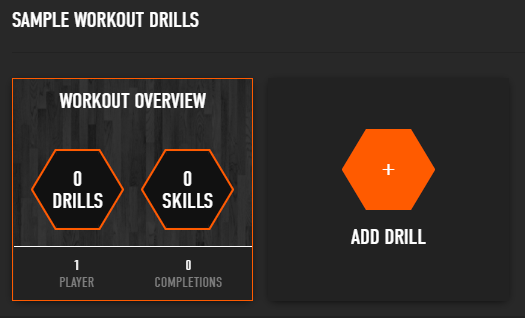
The "Add Drill" Screen Within Creating a Workout
When adding a drill you can choose from shooting, ball handling, and conditioning. Since a majority of our workouts are shooting based, that is what we'll focus on here. The screen below showcases the customization options with creating a new drill.
Here, you can name the drill, upload your own instructional video, and craft a description for players to better understand the drill.
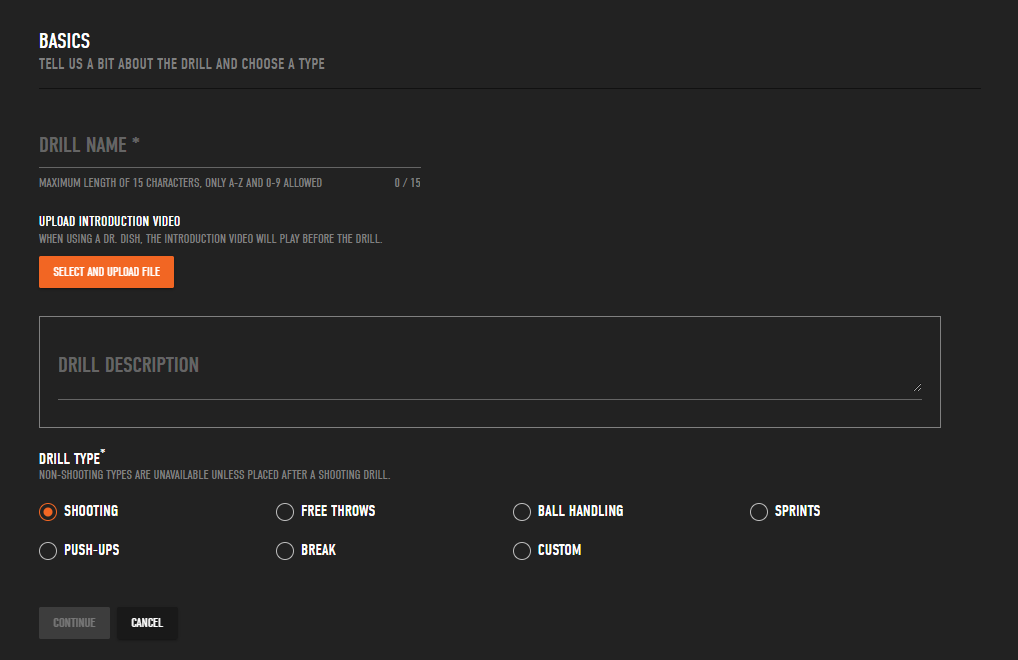
Drill Customization Screen
After adding a new drill, you can select your passing locations. These are the locations the machine will be program to pass to during the workout.
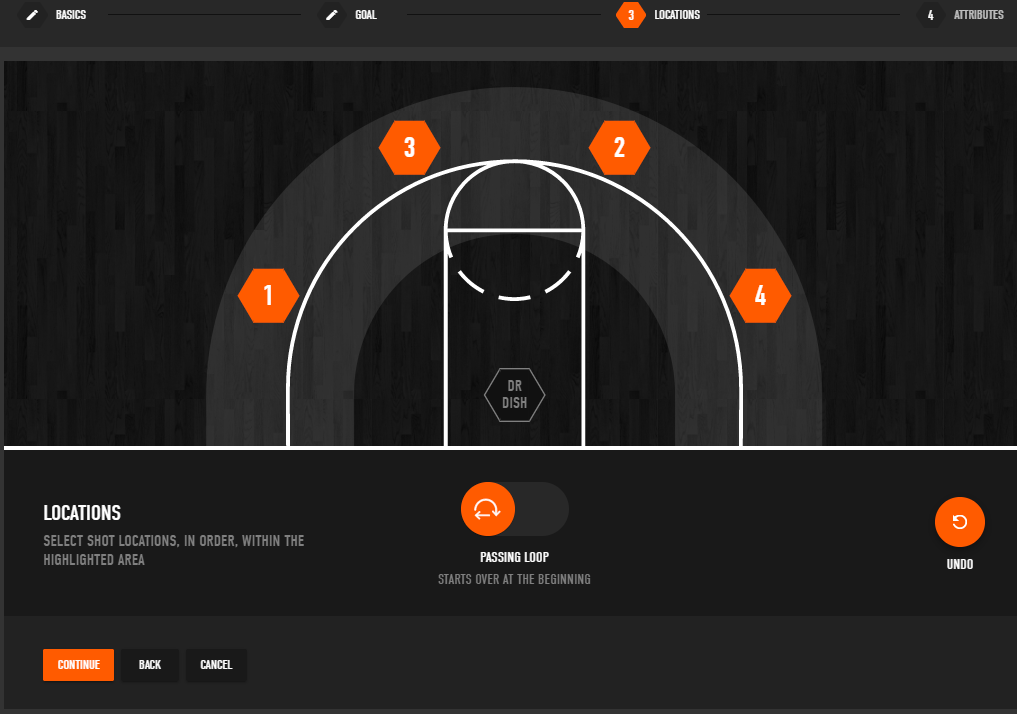
The Passing Locations Screen Within a New Workout
Lastly, you can determine the workout attributes. Here, you can tell the machine how many balls to pass to each location (1-999 passes), the tempo (time between) of each pass, and the number of shots to take, make, or make in a row, depending on the goal you selected.
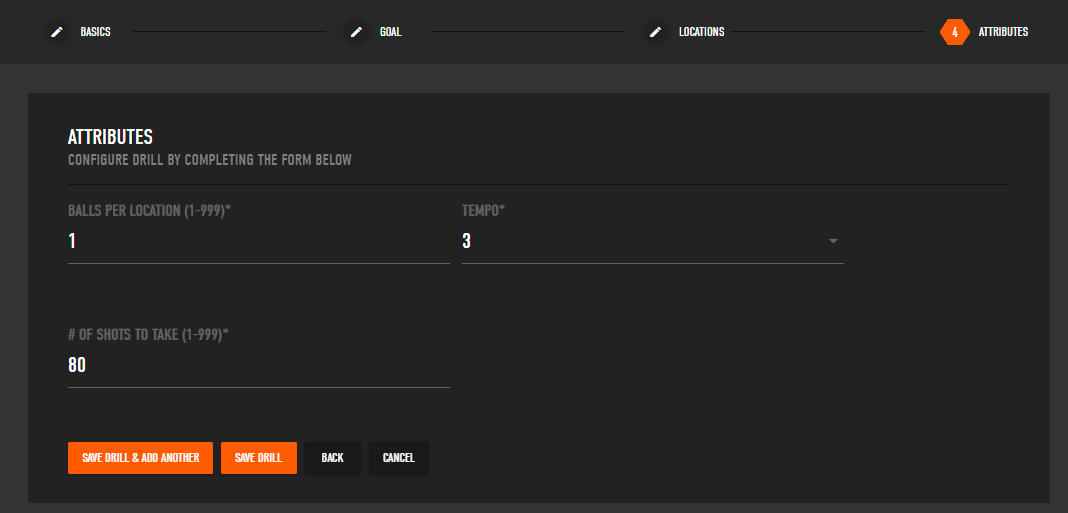
The Attributes Page
Here is a visual of what a completed workout looks like with a video uploaded.
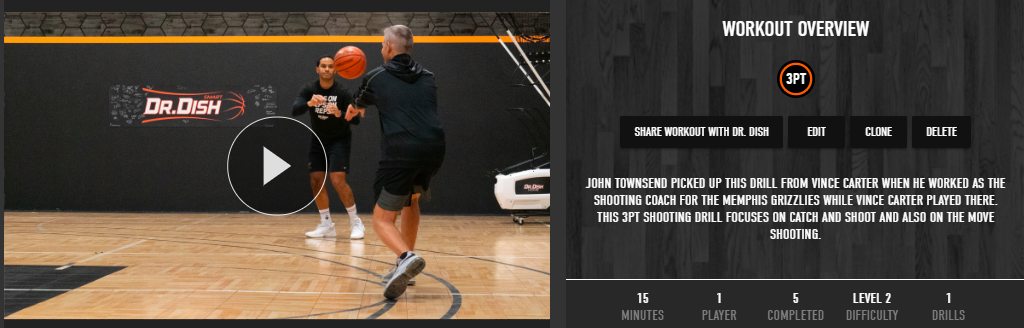
Workout overview screen of John Townsend's "42 Drill"
Step 3: Assign and Track Progress
After your workout is created, you can access it under the "My Training" tab within TMS.
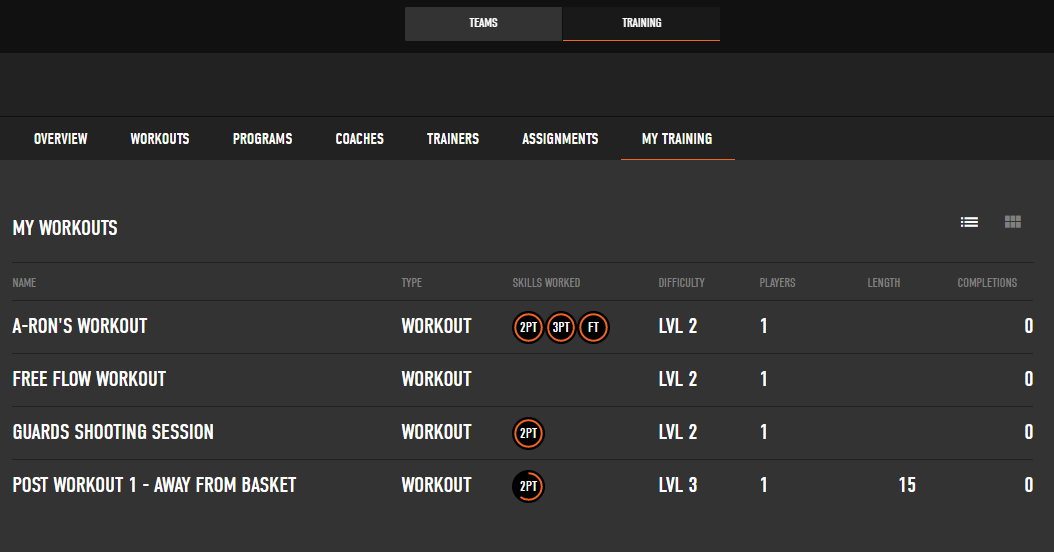
My Training Tab: Highlighting Your Created Workouts
From here, you have the ability to assign workouts to players on your team. You can assign individual workouts depending on difficulty level, position groups, or any other criteria you choose.
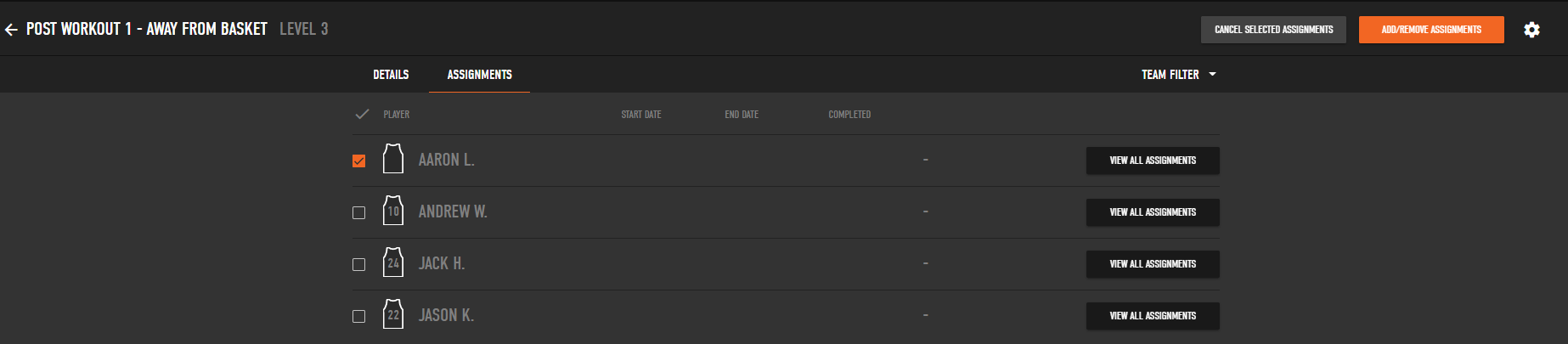
Assignments Tab: Assign Workouts to Players on Your Team
The video below overviews a recap of how to navigate TMS. Give it a watch to better understand the next steps for creating workouts, and fully utilizing TMS.
We hope you've enjoyed this tutorial on how to create your own workouts. While you're training this offseason, be sure to tag us @drdishbball on social media using the #DrDishFam for a chance to be featured on our various social media channels!
If you have any questions on TMS, call us directly at 888 887 7453 M-F 8:00 am - 4:00 pm CST.
- Basketball Drills (440)
- Basketball Shooting Drills (228)
- Basketball Shooting Machine (222)
- Dr. Dish (194)
- Basketball Coaching (157)
- Coach Tony Miller (113)
- Basketball Tips (102)
- Team Drills (98)
- Dr. Dish CT (97)
- College Basketball (87)
- Basketball Training (77)
- Off-Season (70)
- Dr. Dish Success Stories (65)
- Dr. Dish Home (64)
- High School Basketball (56)
- Skill Builder (56)
- Women's Basketball (43)
- Drill of the Week (40)
- Division 1 (38)
- NBA (38)
- Coach Mason (36)
- Player Development (35)
- Basketball Quotes (33)
- Youth Basketball Drills (30)
- Ball Handling (28)
- Coaching Philosophy (27)
- Success Stories (26)
- Basketball Training Equipment (25)
- WNBA (25)
- Mental Training (24)
- Basketball Event (21)
- NCAA (19)
- Training Management System (19)
- Basketball Clinics (18)
- Basketball Practice Plan (18)
- FCLTY (18)
- At Home Training (17)
- Players App (17)
- Ryan Razooky (17)
- Team Inspiration (17)
- FIBA drills (16)
- Giveaway (16)
- Maximize Your Season (16)
- Positionless Basketball (16)
- Basketball Camp (15)
- CT+ (14)
- Europe (14)
- Fundamentals (14)
- Interview (14)
- Jordan Lawley (14)
- iC3 Shot Trainer (14)
- AAU (12)
- All-Star+ (12)
- Basketball Fundraising (12)
- Basketball Post Drills (12)
- Be Better Everyday (12)
- Girls Basketball (12)
- Joe Abunassar (12)
- Skylar Diggins-Smith (12)
- Special Jennings (11)
- Jake Rauchbach (10)
- March Madness (10)
- Motivation (10)
- Shane Hennen (10)
- Trainers (10)
- Cameron Brink (9)
- Debbie Antonelli (9)
- FIBA (9)
- John Townsend (9)
- Kyle Travis (9)
- Louisville (9)
- Mindfulness (9)
- New 2022 Features (9)
- Pure Sweat (9)
- Bjorn Broman (8)
- FastModel (8)
- Milwaukee (8)
- Press Release (8)
- Zia Cooke (8)
- Byron Scott (7)
- DJ Sackmann (7)
- Lindsay Whalen (7)
- Rebel+ (7)
- Culture (6)
- D1 Drills (6)
- Midwest 3 on 3 (6)
- summer of better (6)
- Boys Basketball (5)
- Dish Lab (5)
- Dr. Dish vs The Gun (5)
- EuroLeague (5)
- Florida Gators (5)
- Mike Dunn (5)
- Mike Lee (5)
- Multiplayer Mode (5)
- Pat the Roc (5)
- Q&A (5)
- Special Olympics (5)
- UNLV (5)
- Allie Quigley (4)
- Amy Hunt Home Business Expert (4)
- Greg Stiemsma (4)
- Luka Doncic (4)
- Mentorship (4)
- Train For Next (4)
- Virtual Camp (4)
- 5-Out Offense Actions (3)
- All In (3)
- Athletic Directors (3)
- Basketball Recruiting (3)
- Catalyst Training (3)
- Greece (3)
- Holidays (3)
- Push Beyond (3)
- Spencer Levy (3)
- Strength Training (3)
- Trade-In Program (3)
- preseason (3)
- Assembly (2)
- Dr. Dish TV (2)
- Duke University (2)
- Eurohoops (2)
- Final 4 (2)
- France (2)
- George "Gee" Gervin Jr. (2)
- HCTC (2)
- Head Coach Training Center (2)
- Mathieu Delarche (2)
- Maurice Riddick (2)
- Midwest Basketball Training (2)
- Moris Hadzija (2)
- NBA All-Star Weekend (2)
- NWBA (2)
- Professional Development (2)
- Small Sided Game (2)
- Tyty Washington (2)
- jrue holiday (2)
- post season (2)
- Accessories (1)
- Analytics (1)
- Australia (1)
- Basketball Training Machine (1)
- Brett Brown (1)
- Carlos Frade (1)
- Championship Guide (1)
- Chris Johnson (1)
- Courts of the World (1)
- Curro Segura (1)
- Customer Success (1)
- Dimitri Lauwers (1)
- Father's Day (1)
- Hoops Factory (1)
- Jaume Comas (1)
- Jesus Lazard (1)
- Joerik Michiels (1)
- Knockdown (1)
- Leadership (1)
- National Night Out (1)
- National Teams (1)
- Offline Mode (1)
- Rising Coaches (1)
- Shot Trainer (1)
- Sports Boosters (1)
- Statistics (1)
- Switzerland (1)
- Tony Delk (1)
- Tutorial (1)
- Wheelchair Basketball (1)
- affordable (1)
- endorsement (1)
- green light (1)
- spain (1)
- February 2026 (1)
- January 2026 (3)
- December 2025 (3)
- November 2025 (8)
- October 2025 (7)
- September 2025 (9)
- August 2025 (19)
- July 2025 (20)
- June 2025 (24)
- May 2025 (11)
- April 2025 (6)
- March 2025 (12)
- February 2025 (6)
- January 2025 (6)
- December 2024 (14)
- November 2024 (13)
- October 2024 (16)
- September 2024 (12)
- August 2024 (13)
- July 2024 (9)
- June 2024 (7)
- May 2024 (10)
- April 2024 (12)
- March 2024 (15)
- February 2024 (10)
- January 2024 (10)
- December 2023 (7)
- November 2023 (9)
- October 2023 (14)
- September 2023 (18)
- August 2023 (10)
- July 2023 (9)
- June 2023 (20)
- May 2023 (10)
- April 2023 (8)
- March 2023 (14)
- February 2023 (8)
- January 2023 (12)
- December 2022 (13)
- November 2022 (9)
- October 2022 (11)
- September 2022 (12)
- August 2022 (14)
- July 2022 (18)
- June 2022 (18)
- May 2022 (16)
- April 2022 (16)
- March 2022 (19)
- February 2022 (14)
- January 2022 (10)
- December 2021 (20)
- November 2021 (14)
- October 2021 (19)
- September 2021 (16)
- August 2021 (14)
- July 2021 (16)
- June 2021 (17)
- May 2021 (18)
- April 2021 (15)
- March 2021 (19)
- February 2021 (15)
- January 2021 (20)
- December 2020 (12)
- November 2020 (15)
- October 2020 (15)
- September 2020 (15)
- August 2020 (13)
- July 2020 (14)
- June 2020 (17)
- May 2020 (14)
- April 2020 (13)
- March 2020 (9)
- February 2020 (11)
- January 2020 (11)
- December 2019 (11)
- November 2019 (7)
- October 2019 (11)
- September 2019 (16)
- August 2019 (13)
- July 2019 (9)
- June 2019 (10)
- May 2019 (11)
- April 2019 (7)
- March 2019 (9)
- February 2019 (7)
- January 2019 (6)
- December 2018 (13)
- November 2018 (11)
- October 2018 (12)
- September 2018 (13)
- August 2018 (15)
- July 2018 (10)
- June 2018 (6)
- May 2018 (7)
- April 2018 (7)
- March 2018 (8)
- February 2018 (6)
- January 2018 (7)
- December 2017 (8)
- November 2017 (9)
- October 2017 (9)
- September 2017 (5)
- August 2017 (9)
- July 2017 (10)
- June 2017 (11)
- May 2017 (6)
- April 2017 (6)
- March 2017 (12)
- February 2017 (10)
- January 2017 (15)
- December 2016 (12)
- November 2016 (13)
- October 2016 (12)
- September 2016 (10)
- August 2016 (10)
- July 2016 (8)
- June 2016 (5)
- May 2016 (4)
- April 2016 (8)
- March 2016 (9)
- February 2016 (7)
- January 2016 (6)
- December 2015 (8)
- November 2015 (3)
- October 2015 (1)
- September 2015 (1)
- August 2015 (2)
- June 2015 (1)
- May 2015 (4)
- April 2015 (1)


